Speculative loading is one of the few techniques that can fundamentally change how fast a website feels. And a new kid on the block got introduced: prerender_until_script
Instead of waiting for the user to click a link before starting navigation, the browser predicts where the user will go next and prepares that page in advance. If the prediction is correct, the next page loads dramatically faster. That’s the idea behind the Speculation Rules API.
Current Speculation Rule types
Until recently, developers had two main options:
- prefetch, which only downloads the HTML
- prerender, which loads and executes the entire page in the background
Rather watch a webinar with Barry Pollard (Web Performance Developer Advocate at Google) and Jordy? Back in 2024, they did a webinar discussing Speculation Rules.
And implementation could look like this:
<script type="speculationrules">
{
"prefetch": [
{
"eagerness": "eager",
"where": {
"href_matches": "/*"
}
}
],
"prerender": [
{
"eagerness": "conservative",
"where": {
"href_matches": "^/product/"
}
}
]
}
</script>Both prefetch and prerender approaches have their trade-offs. Prefetch is safe but limited. Full prerender is powerful but expensive and potentially risky. Chrome is now experimenting with a third option that sits between those two extremes: prerender_until_script
This new speculative loading mode prepares almost the entire page in advance but pauses before executing JavaScript. It offers most of the speed benefits of prerendering while avoiding many of its side effects.
Problems of existing approaches
To understand why this new mode exists, we need to look at the limitations of the current options.
Prefetch limitations
Prefetch downloads the HTML document of a page and stores it in the browser cache. When the user clicks the link, the browser can skip the network request and immediately start parsing the HTML.
However, the browser still needs to:
- parse the HTML
- build the DOM
- discover stylesheets and images
- fetch subresources
- execute JavaScript
Prefetch eliminates network latency but not rendering work.
Full prerender caveats
Full prerender goes much further. The browser loads the entire page in a hidden context:
- HTML is fetched
- the DOM is constructed
- CSS is applied
- JavaScript executes
- analytics scripts run
- the page is fully rendered
This means that with prerendering, scripts execute before the user navigates. Analytics tools and third-party scripts may fire prematurely, polluting measurement data and wasting resources. We saw this happening with Clarity
For many sites, this makes full prerender difficult to deploy safely.
If you're dealing with this challenge and you're using GTM, an easy fix is to conservatively load your GTM container
Introducing prerender_until_script
prerender_until_script provides a middle ground between prefetch and full prerender. The browser performs most of the work required to display the page, but pauses before executing JavaScript.
The process looks like this:
- The browser fetches the HTML document.
- The HTML parser begins building the DOM.
- The preload scanner discovers and downloads subresources such as CSS and images.
- Rendering work like layout and styling can proceed.
Everything continues normally until the parser encounters a JavaScript execution point. At that moment the process stops.
Scripts are downloaded but not executed. The page remains paused until the user actually navigates to it.
When the click happens, the page activates immediately and JavaScript execution resumes. But by that time, the browser has already completed most of the expensive work.
The prerender_until_script advantage
With prerender_until_script, the browser's HTML parser stops immediately when it encounters a synchronous script tag. If your page includes inline scripts early in the document, the prerender process will stop at that point.
But when you have full control over the HTML, you can move scripts lower in the document or using defer. This allows more of the page to be prepared ahead of time. Even when parsing stops at the first script, the browser’s lookahead parser may still discover and download additional subresources.
A Speculation Rules comparison
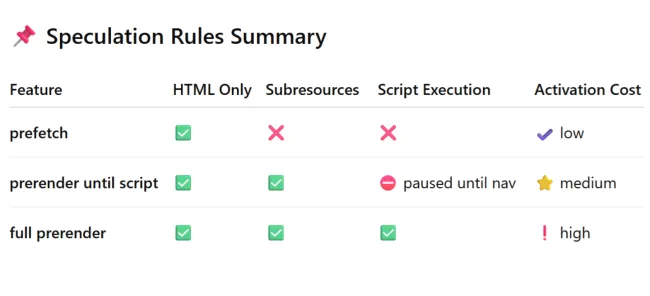
Although still experimental, below is a quick overview of all Speculation Rules types when including prerender_until_script that I also shared on LinkedIn:
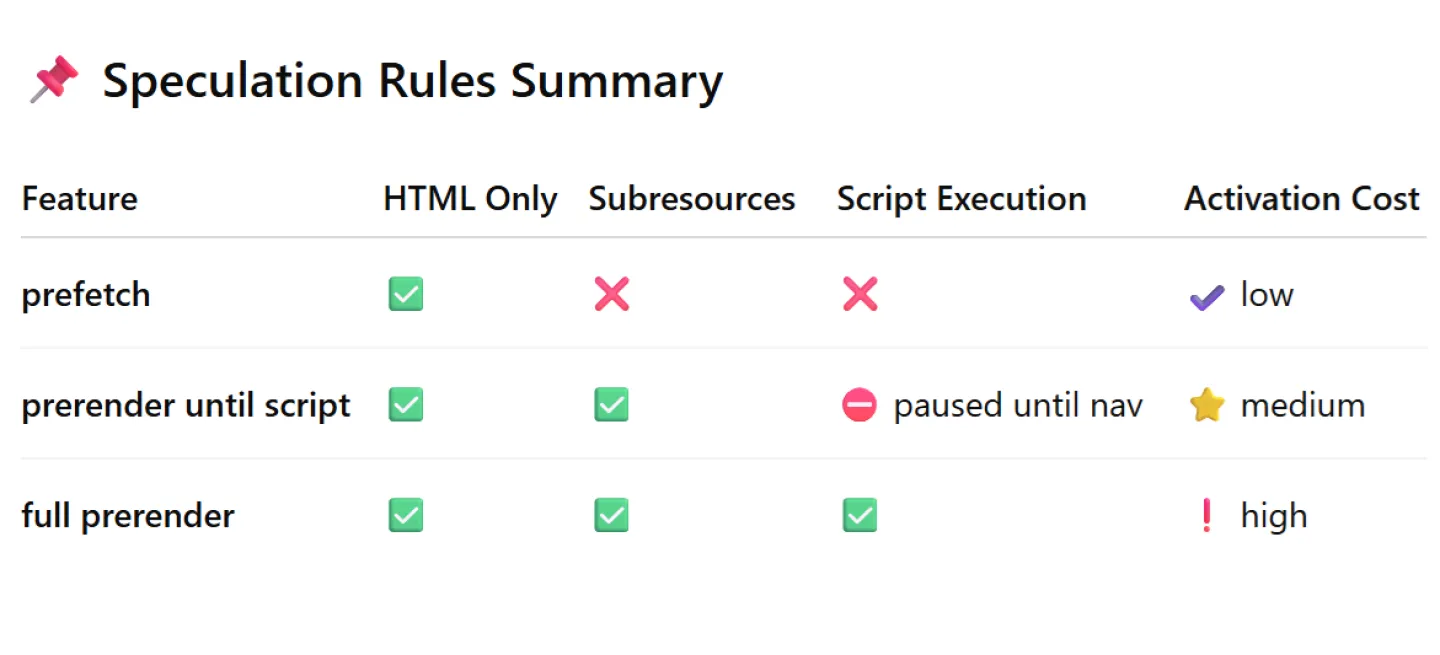
In practical terms:
- prefetch warms the network, but does not fetch subresources
- prerender_until_script warms the rendering pipeline up until the first script
- prerender warms the entire page by fetching and executing all resources and scripts
For many sites, the new mode provides the best balance between performance and safety.
Implementation
prerender_until_script is implemented through the Speculation Rules API. Because the feature is currently experimental, it runs as a Chrome Origin Trial. Unsupported browsers simply ignore the rule.
Participating in the origin trial
If you're a developer, you can participate via this direct origin trial link. If you're a site or shop owner and using RUMvision, you can participate via your RUM tracking. Just configure your settings or reach out to us.
Do note: you still need to setup and implement Speculation Rules yourselves. An origin trial will just inject a token that will force Google Chrome browsers of your visitors to accept the prerender_until_script feature.
To lower the barrier to adoption, I published a script on github that simplifies implementing and testing the feature during its origin trial.
Feel free to use and tailor it, or share with your developer.

Browser support
At time of writing, Speculation Rules is Chromium-only. Below is an up-to-date indication of browser support:
Limited availability
Speculation rules is not Baseline because it does not work in some of the most widely-used browsers.
- Only supported in Chrome 109 and Edge 109
- Continue reading about speculation rules or prerendering
Register to RUMvision to see more resources and learn if your website visitors would already benefit from this feature today.
As prerender_until_script is Google Chrome only, it won't be recognized nor work by other Chromium browsers like Edge, Opera and Brave.
A common implementation pattern is to include a prefetch fallback for browsers that do not support the new mode. In that case, those browsers that do not support prerender_until_script will still execute the prefetch rule if Speculation Rules are supported.
Feature detection
When embedding rules using JavaScript, you can add feature detection to your codebase. For example to fall back to JavaScript libraries like instant.page to still get pages prefetched on older or non-Chromium browsers:
<script>
if (
HTMLScriptElement.supports &&
HTMLScriptElement.supports("speculationrules")
) {
// inject Speculation Rules dynamically
}
else {
// fall back to JS libraries to prefetch HTML
}
</script>Why prerender_until_script matters for performance
Browsers spend significant time on:
- HTML parsing
- DOM construction
- CSS loading
- layout calculation
- image downloads
prerender_until_script allows the browser to complete most of this work before navigation.
When the user clicks the link, the browser only needs to:
- activate the prerendered page
- execute queued scripts
For pages with moderate JavaScript usage, this can dramatically reduce perceived navigation time.
In the best case, the experience approaches full prerender performance. In the worst case, subresources are still downloaded early, providing a smaller but still meaningful improvement.
Measuring real user impact
You might see impressive results for speculative loading, but real-world impact depends heavily on user behavior. And numbers tell the tale, so why not measure it in real user situations?
Real User Monitoring is essential for understanding:
- how often speculative navigations succeed
- the impact on metrics like TTFB, FCP and Core Web Vitals in general
- how different speculation strategies perform across devices
Without RUM data, it is difficult to determine whether speculation rules are helping or hurting real users. With default filters provided by RUMvision dashboards, you can already segment pageviews and experiences by navigation types.
About to or already deployed Speculation Rules on your website but not using RUM yet? Start tracking today!