
Black Friday is just around the corner! What can you do to make sure your users experience is optimal? Allow us to share 9 quick-wins to make sure you do not miss out on conversions or brand loyalty in the long run. Almost no coding required!
We call it the Black Friday, Cyber Monday rush, but let's be honest, it's basically the whole month of November that is crazy these days for most e-commerce companies. So chances are that right now you already have a lot of users visiting your site. And maybe even more the upcoming weeks. Is there anything we can do from a sitespeed user experience point of view to speed things up in terms of selling for those visitors?
Well, yes!
At RUMvision, we've analyzed performance data from thousands of e-commerce sites during peak shopping periods and we've made you a quick guide of issues that happen often and can easily be prevented!
The best part? Most require minimal coding and can be implemented quickly. Because we understand you have other things to do, like check inventory and make campaigns. Let's go!
(prefer a nice and interactive slide, we've got you covered ↴)
1. Incorporate new UTM parameters into your caching strategy
Talking about those marketing campaigns, let's kick off with a easy win that is REALLY costly if you forget about it.
Black Friday often involves running extensive advertising campaigns on platforms like Google and Facebook, as well as sending out newsletters with UTM parameters to track campaign performance. To ensure that these campaigns don't negatively impact your pagespeed, it's so important to collaborate closely between your marketing and development teams.
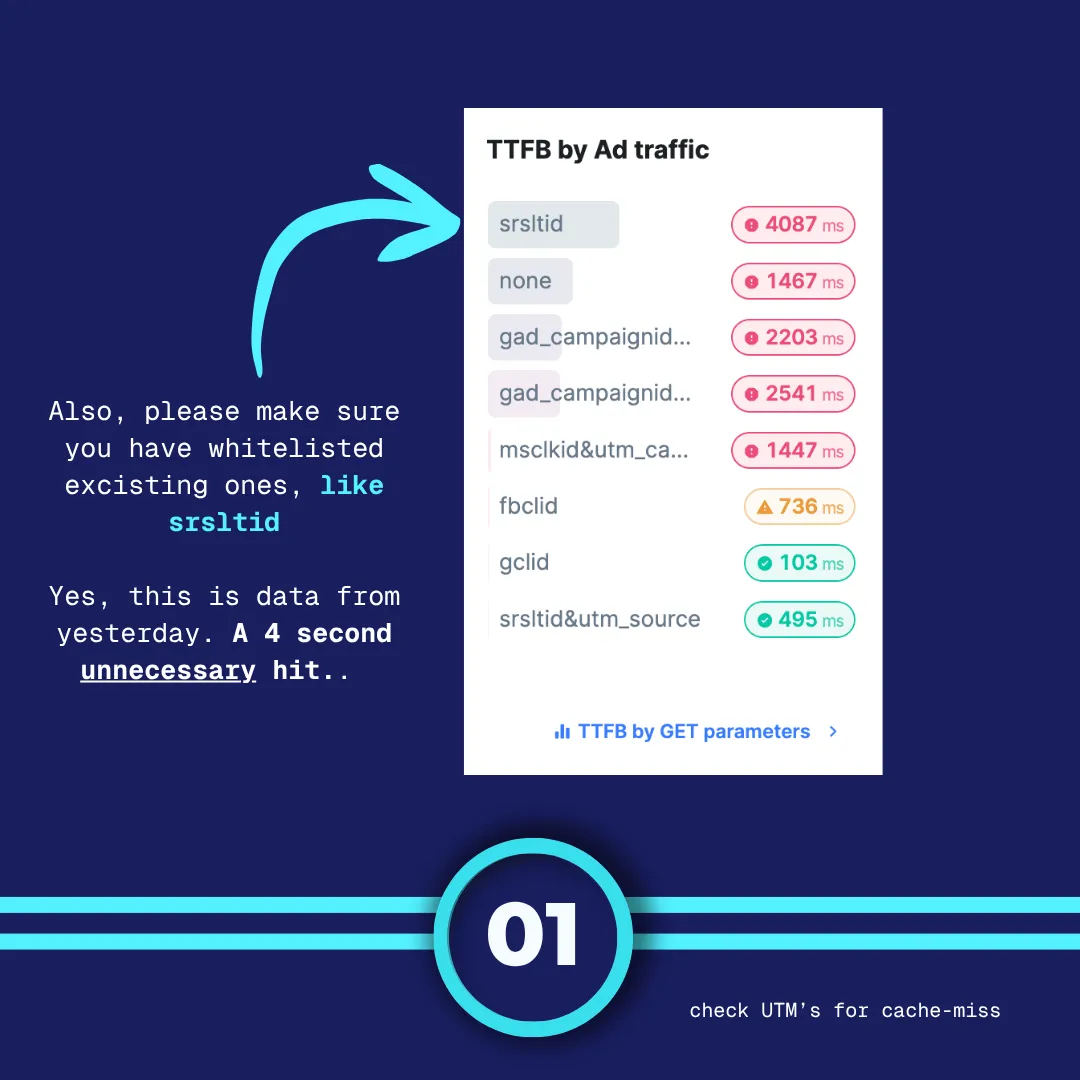
Make sure that any new UTM parameters or tracking codes are added to your caching strategy. This will help prevent unnecessary cache misses and ensure that your website loads swiftly for visitors arriving through these campaigns. Especially if you use a CDN, this can be a huge win in terms of performance, that's very easy to accomplish.

And it's not just about new campaigns parameters. You'd be suprised how often people still haven't updated for instance strtlid. If you don't do any of these other things, just please tackle this one!
2. Temporarily disable heatmaps and monitoring tools
While tools like heatmaps and New Relic are valuable for gaining insights into user behavior and performance, they can also introduce additional overhead during peak traffic times, like Black Friday. These tools often have a noticeable impact on your website's Interaction to Next Paint (INP), which can slow down the user experience.
To optimize your pagespeed during the Black Friday month, consider temporarily disabling these tools. You won't miss out on any critical or new information during this short period, and your visitors will appreciate the improved performance. You can start collecting the insights again after the rush.
The screenshot below shows how heatmap impacts the INP.

And if you want to keep them, at least consider swapping them out for a faster alternative. And keep that after BF/CM. 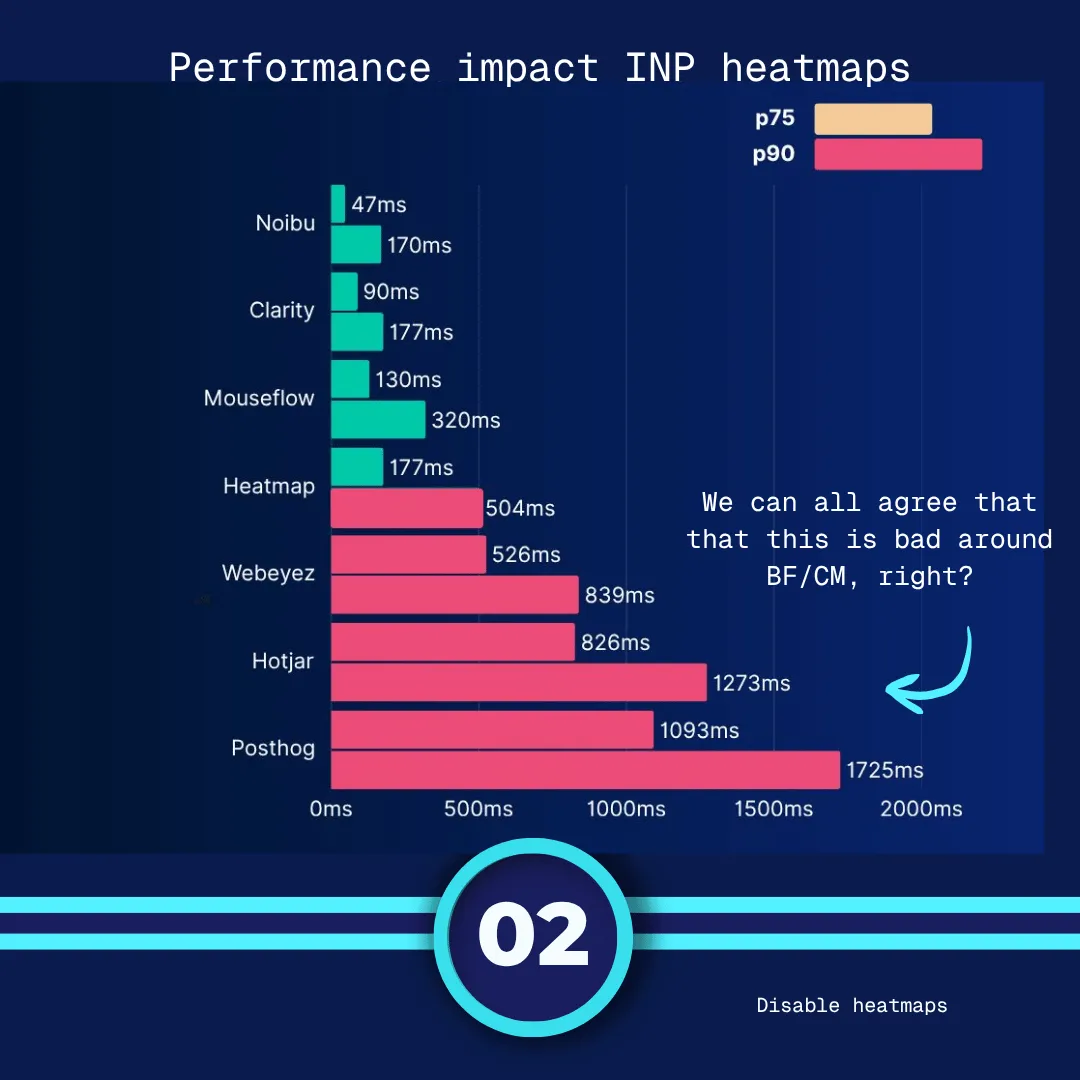
3. Gather real user monitoring (RUM) data
So, where do we find all this data and can you find it as well? Well yes, hi! We are RUMvision and we sell.. real user monitoring. So, all of these issues we're telling you all about in this article, we can visualize for you! But you'd have to install our rumvision snippet on your site to gather this info.
Because before you can effectively optimize your website's pagespeed, you need to understand how all your visitors experience your site. RUM data provides invaluable insights into real user interactions, load times, and performance bottlenecks.
By collecting this data, you can identify areas that require improvement and prioritize your optimization efforts accordingly. Without RUM data, you'll be navigating in the dark, unaware of what's happening and why. So, take the time to set up RUM monitoring and gather the necessary data to inform your optimization strategy.
Action: do it now. The nice thing about real user monitoring like RUMvision is that we can help you get all this data in 30 minutes of getting started. That still leaves you with plenty of time to find and fix issues before the stress and rush of Black Friday, Cyber Monday, and holiday shopping. For instance, to fix your CLS issues! Or, check your lazyloading strategy! It also gives you the time to check the following wins that you might want to incorporate into your upcoming Black Friday strategy.
Are you using RUMvision? Check november pageviews
Extra tip: if you are already using RUMvision, please do a check on your monthly pageviews. Our subscription run per month, so if you expect more than your usual pageviews (we see 300% or more these days), upgrade or enable autoscaling. You can always dial it back in January, when traffic is lower.
4. Implement or verify Back/Forward caching
Back/forward cache is a browser feature that allows users to navigate between pages they've recently visited without reloading them entirely. Implementing or verifying that your website supports back/forward caching can significantly enhance the user experience. It reduces loading times when users revisit pages, creating a smoother and faster browsing experience. Ensuring that your site leverages this browser feature can be a quick win for pagespeed optimization, as you can spot it within 5 minutes.

5. Remove A/B Testing until traffic slows again (no pun intended)
A/B testing is a powerful tool for optimizing your website's user experience and conversion rates. However, the JavaScript code required for A/B testing will impact your pagespeed, especially during high-traffic events like Black Friday. And let's be honest, these are weird days anyway, how reliable is the data that you're going to get.
So, if you're not going to use it, remove it and get it back when traffic is normal again. Because an A/B test will cause your visitors to look at a white screen (FCP) as it's waiting to execute it's Javascript. And this is generally accepted as the biggest rage inducing thing on the web. We don't want that during the rush, right?
Please note: you have to remove it, pausing it might still mean it get's executed.
6. Remove CSS @import from your code
Ok, this one does take some coding, but it should be really easy! Our CTO and lead consultant Erwin Hofman wrote a whole indepth article after analyzing 16 million sites that you should really, really kick out @import.
Simply replace it with <link rel= stylesheet>
Just, trust us, it will make your site much faster as it renders way faster.
7. Aim for the 90th percentile
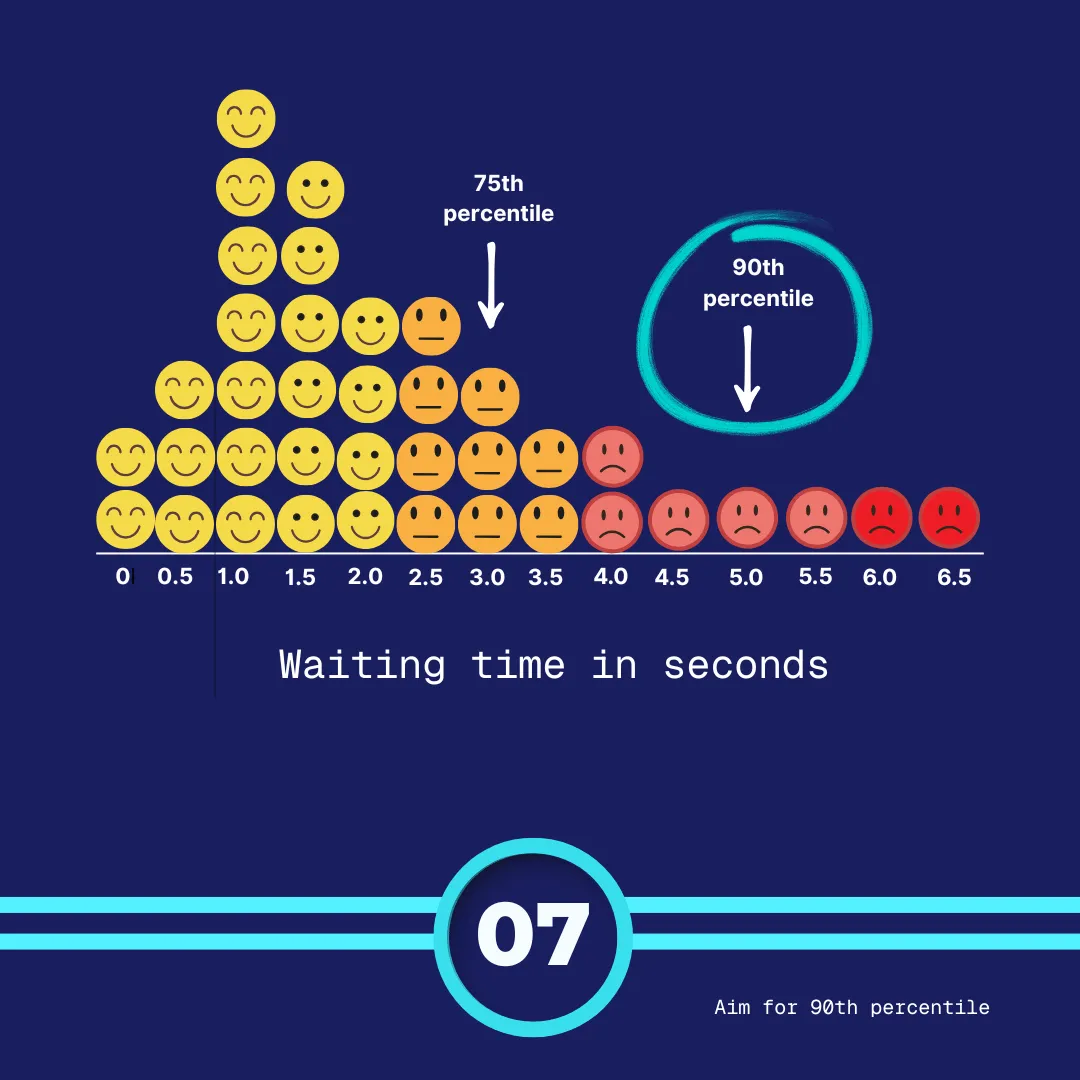
If your only only pagespeed goal is to be good enough to pass Core Web Vitals tresholds, you miss 1 in 4 of experiences that are worse than that, as it gets measured on the 75th percentile.
1 in 4 is A LOT of people with a bad experience!
Check out your site on the 90th percentile and see how bad it's out there. Because the 90 the percentile will have a lot of interesting users you do want to have eyes on during this holiday season. People who come in from your campaigns, cold visits (without cache), people with mid-range phones and bad internet that still will really want ot shop with you, if you let them.
8. Have a strategy with your speculation rules
Speculation rules are awesome. They are also CRAZY powerful, and especially if you run them with a high eagerness in prerendering + with a huge spike of visitors = possibly a server issue.
I'm not saying not to use them, do, they can result in almost an instant page! But, have eyes on them, check in with your server and maybe set the eagerness a little less ambitious if you're worried? Or basically: just have a strategy in place.
9. Quick fixes, long term benefits
Research shows that people who have a slow experience on a site, are less likely to return to your store in the future. You might win them now on your really awesome low price, but what about in the future? All these tips will ensure that not only they have a good experience during these busy times, but build trust and brand loyalty.
Win-win!
Let's wrap it up!
Want to get started with collecting the data of your users's experience, real time Core Web Vitals or simply check whether your team has all these 9 wins implemented?