Health Checks analyze your real user data and turn it into clear, actionable insights. Instead of spending time hunting for performance issues yourself, RUMvision now finds them for you. Spend less time hunting and more time fixing issues.
Optimizing Core Web Vitals in production is a different beast from running Lighthouse locally. Field data is noisy, regressions are subtle, and chasing down the actual cause of a performance drop means cross-referencing INP breakdowns, hunting CLS culprits across templates, and wondering whether that last deploy actually moved the needle. It's time-consuming work, even for experienced teams
RUMvision 2.0 introduces Health Checks to take most of that off your plate.
What Health Checks do
Health Checks continuously analyze your real user data and surface issues as actionable to-do's. Each one comes with a plain-language explanation of what's wrong, concrete steps to fix it, links to relevant documentation, and a direct link to the right view in RUMvision.

The idea is simple: you shouldn't have to dig through charts and tables to figure out what to work on next. RUMvision does that analysis for you and hands you a prioritized list.
Eight checks running from day one
The first release covers eight checks targeting some of the most common and impactful Core Web Vitals issues in production. It runs them on all your templates and on mobile and desktop.
- Marketing query parameter regressions: detects performance drops tied to UTM or similar tracking parameters
- Non-marketing query parameter regressions: catches parameter-driven regressions outside campaign traffic
- Large rendering gaps: detects large gaps between Time to First Byte (TTFB) and First Contentful Paint (FCP)
- Low Back/Forward Cache usage: surfaces poor bfcache hit rates, which directly hurt navigational performance and perceived load speed
- CLS element movement: identifies the specific elements responsible for layout shifts
- Slow INP elements: pinpoints which interactions are dragging your INP score up
- LCP images that are lazy loaded: catches the common mistake of lazy loading your above-the-fold LCP image
- Slow hostnames affecting INP: isolates first- or third-party host latency through LoAF that's hurting interaction responsiveness
Checks run continuously against your live field data, and we'll be adding new ones every month.
Optimizing beyond p75
The Core Web Vitals pass/fail thresholds sit at the 75th percentile, but that's a floor, not a finish line. Health Checks evaluates issues at p75, p85, and p90. It works through them in order: if your p75 is clean, it moves on to p85, then p90. That way you're always focused on the next most impactful optimization, not just maintaining a passing grade.

All three percentile scores are visible at the top of the Health Check dashboard.
Tracking issues through to resolution
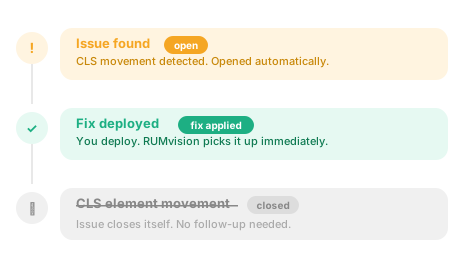
Every issue has a status so you always know where things stand, useful both for solo work and when collaborating across a team:
- Open: a problem was detected
- Fix Applied: you've implemented a change
- Fixed: the improvement is confirmed by your RUM data
- Auto Closed: the issue resolved on its own
- Warning: a fixed issue has come back
- Ignored: you dismissed it manually
No more "did that deploy fix it?" The data tells you. You can also watch it in our product tour.
Health Checks are live today for all RUMvision users
Log in and see your open issues
Not on RUMvision yet? Add the snippet, connect your domains, and Health Checks will start running against your real user data right away.