Web performance improvements often come from small, incremental gains. Better caching, fewer requests, smaller files. Every once in a while though, a new platform feature shows up that makes you pause and think: why has this not been mainstream already?
Compression Dictionaries (introduced to the public at performance.now() 2023) are one of those features.
This week, our website started running on Compression Dictionaries. And yes, you can probably blame me for this. While I was away for the night, Erwin Hofman decided to use that quiet time to experiment with them and then went all the way to implementing them in production.
Luckily, this is one of those experiments that turned out very well.
On his first attempt alone, the HTML payload of our features page became 45.5 percent smaller. After a few iterations, we saw even more consistent gains across the site.
If this sounds interesting, you might be wondering what Compression Dictionaries actually are, how they work conceptually, and when they are worth considering. That is exactly what this article will cover.
Compression Dictionaries explained
At a high level, Compression Dictionaries make text-based files smaller by letting the browser and server share context.
Compression beyond images
Most people are already familiar with the evolution of image compression on the web. We started with JPEG and PNG as the dominant formats. Over time, newer image formats like WebP and AVIF appeared.

January 26th, 2024 marks one year since all major brows…
They did not change what images are, but they changed how efficiently those images are represented and transferred. And the result was straightforward: the same visual content, smaller files, faster pages.
Building on Gzip and Brotli
Compression Dictionaries follow a very similar pattern, but for text-based content like HTML, CSS, JS or and JSON.
For years, we have relied on general-purpose compression algorithms like Gzip and later Brotli to make text-based payloads smaller. Those algorithms were a major step forward, just like WebP was for images.
Brotli and Gzip look at a single file in isolation. They find repeated patterns within that file and compress them. This means that your developers no longer needs to consider shortening variable names to cc instead of cookie_consent. You can safely prioritize readability over performance.
Still, Brotli or Gzip ignores something important: websites tend to repeat the same patterns across many pages: Think of metatags, navigation menus, headers, footers, repeated class names et cetera. Compression Dictionaries take advantage of that.
A dictionary for your resources
Instead of compressing each file completely on its own, the browser first downloads a shared dictionary. That dictionary contains commonly repeated text fragments. When the server later sends a page, it can reference that dictionary during compression. The browser already knows those fragments, so the compressed response can be much smaller.
This mechanism is standardized as Compression Dictionary Transport, which defines how browsers and servers safely agree on which dictionary is used.
Not a binary format
One important detail that often surprises people is that a compression dictionary is not a special binary file.
It is just text.
A dictionary can contain HTML, CSS, JavaScript, or any combination of text fragments that are common across your site. If you open a dictionary file in a text editor, you will usually see readable markup.
Tools like use-as-dictionary.com make this very tangible by letting you generate and inspect dictionaries based on real pages. This helps demystify the concept and shows that dictionaries are simply shared text context.
Required headers
To make this work safely, browsers and servers coordinate using a small set of HTTP headers. The important takeaway is not the exact header names, but the principle:
- The browser explicitly tells the server which dictionary it has.
- The server only uses a dictionary if it matches exactly.
- Dictionaries are validated by their content, not by filename.
This avoids a class of problems that older attempts at shared compression struggled with.
Browsers and adoption
Compression Dictionaries only matter if browsers actually support them and real websites adopt them.
Browser support
Compression Dictionary Transport has first been available as an origin trial in Chrome since version 119 and has already shipped end of 2024.
At time of writing, both Firefox and WebKit have publicly positive signals around the feature as well, which is a strong indicator that this is not a dead-end experiment.
Limited availability
Compression Dictionary Transport is not Baseline because it does not work in some of the most widely-used browsers.
- Only supported in Chrome 130 and Edge 130
- Continue reading about rfc9842
Register to RUMvision to see more resources and learn if your website visitors would already benefit from this feature today.
As with many newer platform features, adoption will be gradual, but the direction is clear.
Adoption across the real web
Despite the clear benefits, Compression Dictionaries are still in the very early stages of adoption.
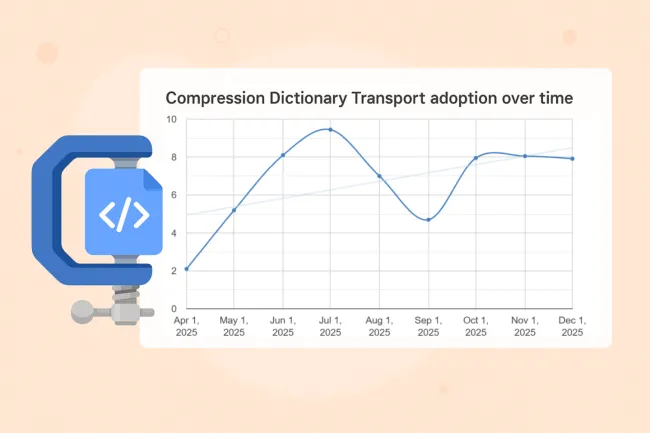
Data from Chrome Status shows that Compression Dictionary Transport is currently used by a fraction of page loads on the web. The big jump could be explained by enterprise companies like Google, Etsy, Amazon and Ebay experimenting with it, as they will benefit from it the most when reducing payloads of millions of requests.

Compression Dictionary Transport adoption is still low, but trending upward as browser support and real-world experiments increase.
The general direction is encouraging though. Browser support will improve, specifications has stabilized, and more real-world write-ups and experiments are starting to appear. We hope articles like this help demystify Compression Dictionaries and Compression Dictionary Transport, and lower the barrier for others to try them out.
As more sites adopt the technique and share their results, it will become easier to understand where Compression Dictionaries provide the most value, and how they can be rolled out safely at scale.
Compression Dictionary benefits
Why this matters
The main benefit of Compression Dictionaries is simple: smaller responses.
Smaller responses mean:
- Less data transferred over the network
- Faster page loads, especially on slower connections
- Lower bandwidth usage
- Better performance consistency across navigations
All of this comes without adding any client-side JavaScript or runtime cost.
Real-life examples
The WICG has published examples of static and dynamic implementation that show significant size reductions for HTML and other text resources when Compression Dictionary Transport is applied. These examples consistently demonstrate large wins compared to traditional compression alone.
Our numbers
On our own website, we compared traditional Brotli compression with two different Compression Dictionary versions.
Across a wide range of pages, we saw:
- HTML transfer size reductions of roughly 30 to 70 (for smaller HTML files) percent
- Consistent improvements across marketing pages, blog pages, and informational content
For example, pages that previously transferred around 12 to 14 KB of compressed HTML were reduced to roughly 5 to 8 KB with Compression Dictionaries, depending on the dictionary version used. These measurements were collected from real navigations and compared side by side. And results are as following:

Erwin tested with a more naïve dictionary implementation (dcz-24kb: containing head, header and footer) and a more tailored dictionary (dcz-51kb, also containing webpage components of several pages).
You can view this data in an interactive chart.
Which metrics benefit
Because Compression Dictionaries primarily reduce transfer size, they most directly influence metrics such as:
- Time to First Byte in constrained network conditions
- Largest Contentful Paint as candidate (like image) discoverability improves
- Navigation speed between pages that share structure
- Sites adopting APIs like View Transitions could then benefit as well

Are your Core Web Vitals failing due to a LCP over 2.5s…
They are not a silver bullet, but they complement existing optimizations very well.
Side notes and trade-offs
A short note on privacy and safety
Shared compression has been attempted before on the web. Earlier approaches struggled with safety concerns, especially around cross-origin data leaks.
Compression Dictionary Transport addresses these issues by making dictionary usage explicit, origin-scoped, and hash-validated. The browser never guesses which dictionary to use, and the server never assumes what the browser has.
This is why the feature is considered safe to deploy today.
Application- vs infrastructure-level
Compression Dictionaries can be applied at different layers of the stack.
They can be implemented at the application level. We went with PHP given its flexibility, but comes with some server-side cost. A preferred method is to implement it at higher layers such as reverse proxies or CDNs, which generally handle compression more efficiently.
Conclusion
Compression Dictionaries are a very promising addition to the web platform.
They do not replace existing compression techniques, but they build on top of them by reusing shared structure across pages. When applied carefully, they can deliver substantial reductions in HTML size with no client-side overhead.
Our early results are encouraging, and we hope to see more sites experiment with Compression Dictionaries and Compression Dictionary Transport in the coming months. As adoption grows, it will become easier to measure their impact at scale and understand where they fit best.
Smaller HTML, faster navigations, and better real-user performance are hard goals to argue against and even if TTFB wins are noticeable as of the 90th percentile i.e. slowest 10% of experiences, it's a win in my book!