
RUMvision MCP
Optimizing
in cheat mode,
inside your own AI
Connect RUMvision MCP to your AI client.
Give it access to your RUMvision data and let it investigate what got slower, what's hurting Core Web Vitals, and what to fix next.
No need to dig through dashboards first.
Monitoring 1.500 domains, including


Why MCP
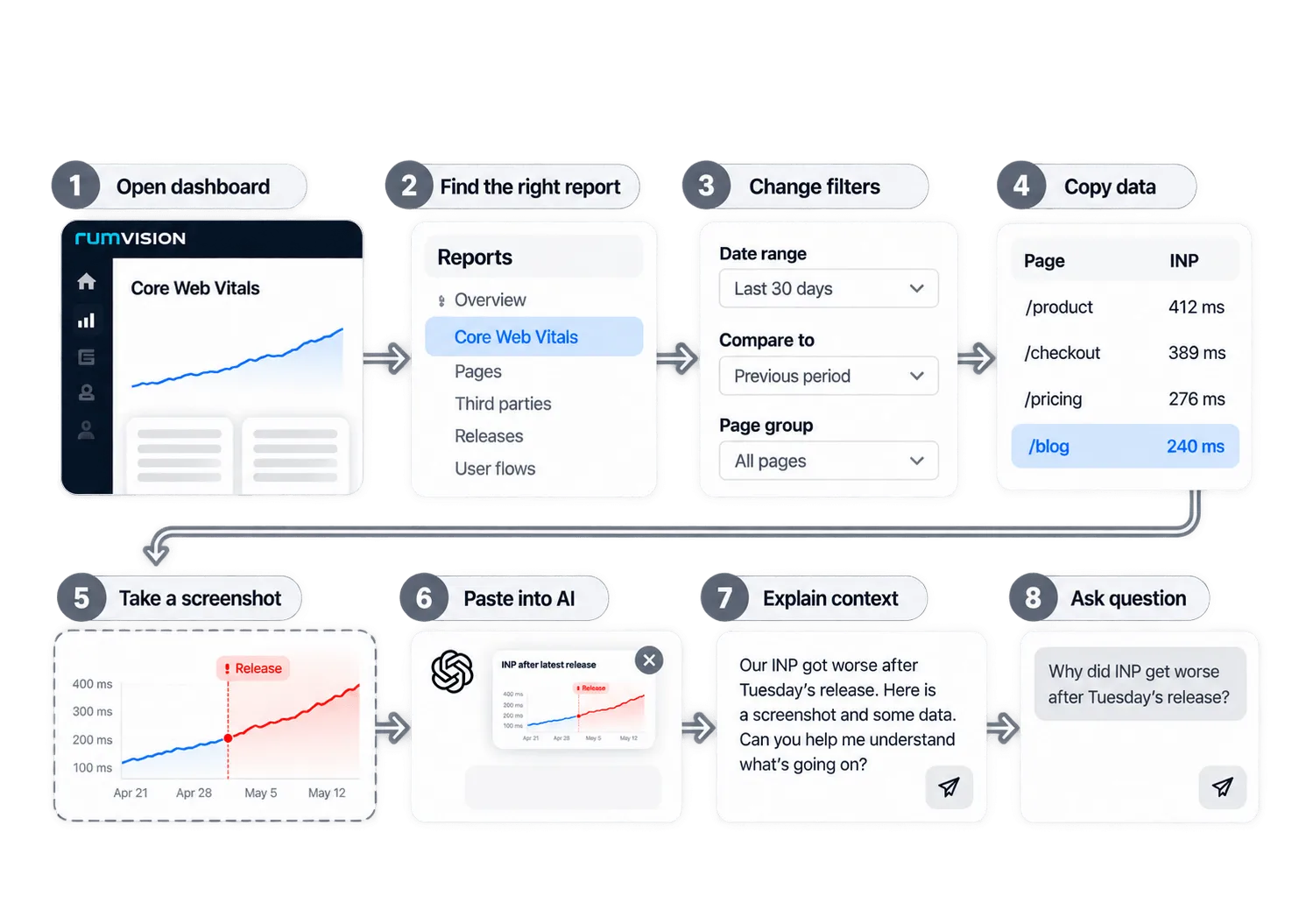
Goodbye to uploading charts to your AI
When you're doing the investigation.
You find the right data before AI can help, decide what matters, then share screenshots and explain enough context for AI to understand part of the problem.
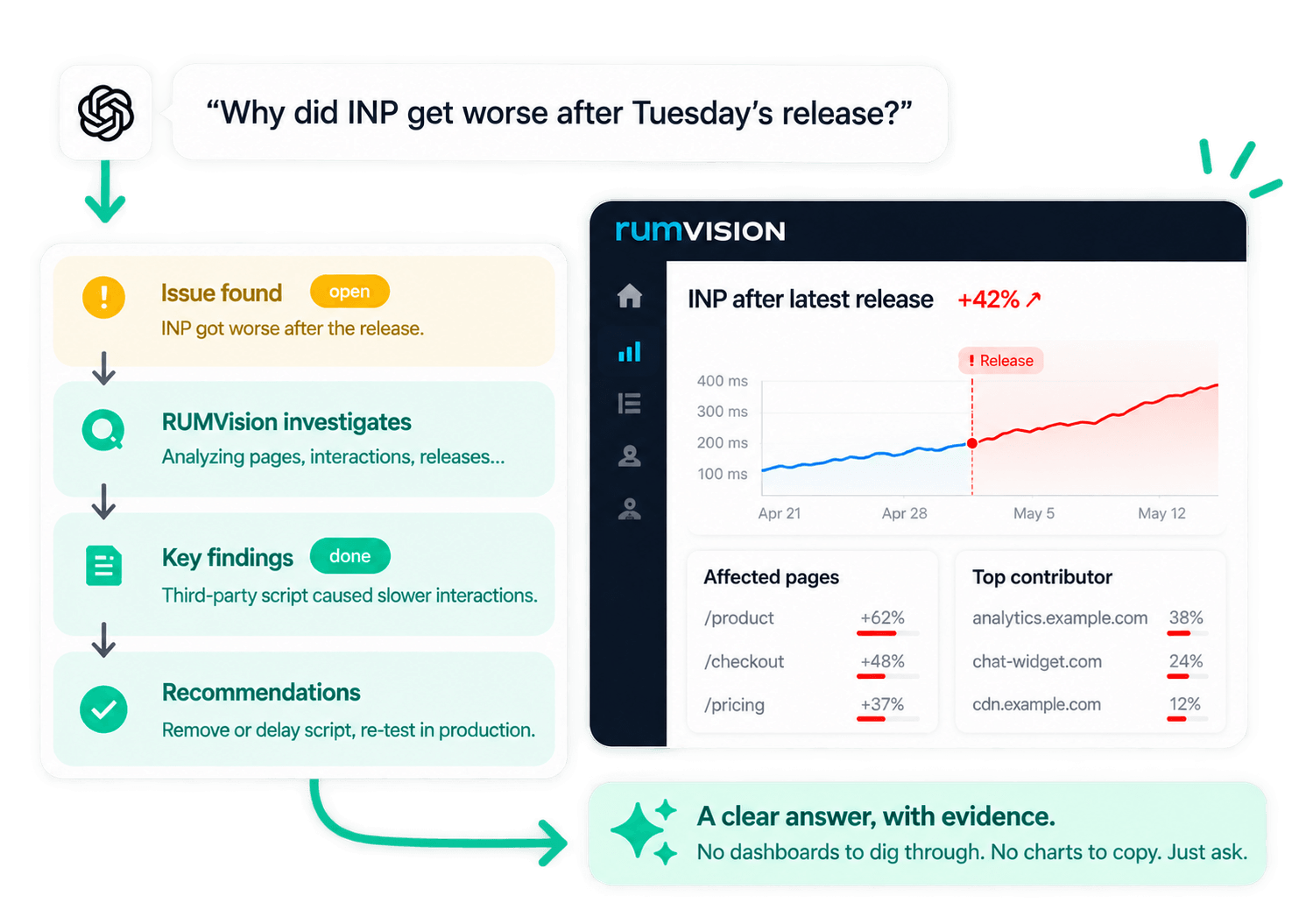
Get your answers, in a single question.
Your AI finds the relevant data, checks the right metrics and segments, and follows the evidence across your RUM data while you get other stuff done.
MCP in short
But what exactly is MCP?
MCP, or Model Context Protocol, lets your AI connect directly to external tools and data.
For RUMvision, that means your AI can ask for the performance data it needs while investigating. Instead of relying on screenshots and context you provide, it can retrieve the relevant evidence itself.
Your AI client
ChatGPT, Claude, Gemini or your IDE. You ask the question
RUMvision MCP
Read-only tools that fetch exactly the evidence needed.
Your RUM data
Real user data of your (clients') sites, processed in the EU.
Adopt the MCP approach
AI gets way more useful with data from real users
Anthropic's engineering team used AI + RUM data to make claude.ai roughly 3x faster in 2 weeks.
The interesting part isn't Claude. It's the loop.
MeasureInvestigateChangeMeasure
3xfaster claude.ai
in a 2 week sprint
Once Claude can measure something, it can make it faster. So we kept finding more things to measure.

Stop drowning in metrics.
Just start asking questions.
Your AI finds the RUM, Core Web Vitals, CrUX and performance evidence needed to answer them.
MCP reviews
What teams see
with RUMvision MCP
We build e-commerce for a living, so performance data has to hold up under scrutiny. RUMvision does. Last week we ran a deep analysis through the MCP and within 5 min we had a full report for our client: specific time windows where the cache behaves as if it is permanently cold, the TTFB that comes with it, and a set of URL parameters quietly fragmenting cache entries. Only minutes later our same Claude agent had implemented the fixes needed for review. That is not something a lab tool tells you. Highly recommended for anybody that wants to stop arguing about performance and start proving it.

The RUMvision MCP lets us ask questions about real user data across all our client sites and get the culprit script or element in seconds. Less digging, more fixing. We also connected it in our automation workflow to implement it in reports and let us set up alerts much faster. A must-have for any agency doing technical SEO.

We use the RUMvision MCP with Claude for performance reports, developer tickets and almost every proposal we make. The strongest part is that an LLM with access to RUM data finds patterns I wouldn't find on my own. That changes our business cases: instead of general advice, we show a client which pages slow down their real users and since when. We can link that to events in the history of the shop, such as a release, a new third-party integration or a tag that a marketer added in GTM.

Different teams.
Different questions.
Single source.
From releases to rankings and user journeys, every team can investigate performance from their own perspective.

MCP by RUMvision. For those with a different ambition.
Pagespeed optimization doesn't have to be your priority. RUMvision provides the insights. Leave your AI to it. You spend your time elsewhere.
MCP questions
Questions? Good place to start.
New to MCP? Here’s how it changes the way you investigate performance.
What is MCP?
What is MCP (Model Context Protocol)?
MCP stands for Model Context Protocol. It is an open standard that allows AI applications to connect to external tools and data sources.
Without MCP, an AI assistant mainly works with the information available in the conversation and the tools already built into the application. With MCP, it can request additional information from connected services when it needs it.
For web performance, this means your AI can investigate performance data instead of asking you to find charts, copy metrics, take screenshots, and explain the context yourself.
What is a web performance MCP server?
A web performance MCP server connects an AI application to tools and data used for measuring and investigating website performance.
Instead of only asking general questions such as “How can I improve LCP?”, you can ask questions about an actual website, its Core Web Vitals, pages, users, performance regressions, or other available performance data.
The MCP server acts as the connection between your AI and the web performance platform. It gives the AI tools it can use to investigate a question and gather the evidence needed for an answer.
What is RUMvision MCP?
RUMvision MCP connects MCP-compatible AI applications like like ChatGPT, Claude and others to RUMvision's web performance tools and data.
It allows your AI to investigate topics such as Core Web Vitals, Real User Monitoring (RUM), CrUX data, slow pages, regressions, user interactions, third-party scripts, and performance bottlenecks.
Instead of navigating through dashboards yourself, you can start with a question. Your AI can then use RUMvision to gather the relevant performance data and help you understand what is happening.
How is RUMvision MCP different from asking AI about PageSpeed or Lighthouse results?
A Lighthouse or PageSpeed Insights test gives an AI information about a specific test or report. That can be useful, but it is not the same as investigating what your real users experience.
RUMvision collects Real User Monitoring data from actual visits to your website. This makes it possible to investigate performance across different pages, templates, devices, interactions, and other dimensions instead of relying on one simulated page load.
RUMvision MCP gives an AI access to that deeper performance context. So instead of only explaining why a Lighthouse audit might be failing, it can help investigate which users are affected, where a problem occurs, and what evidence points to the cause.
What is the difference between RUMvision MCP, CrUX and Lighthouse?
They serve different purposes.
Lighthouse runs a synthetic test under controlled conditions. It is useful for audits and debugging, but it does not represent every real visitor to your website.
Chrome UX Report (CrUX) contains aggregated field data collected from eligible Chrome users. It can show how a website performs for real users over time, but the available dimensions and diagnostic detail are limited.
RUMvision RUM collects detailed performance data from your own website and users. This makes deeper investigation possible.
RUMvision MCP is not another performance metric. It is the connection that allows an AI application to use available RUMvision tools and performance data while investigating your questions.
What can it do?
What can I ask RUMvision MCP?
You can ask RUMvision MCP questions in normal language. You do not need to know which report, metric, or filter to use first.
For example:
- Why did our INP get worse?
- What is causing poor LCP on our product pages?
- Which third-party scripts have the biggest performance impact?
- Did our latest release improve Core Web Vitals?
- Which performance issue should our developers investigate first?
- Compare the performance of these page templates.
The available data determines how deeply RUMvision MCP can investigate a question. Websites using RUMvision Real User Monitoring provide much more detailed evidence than public data alone.
Can RUMvision MCP analyze Core Web Vitals like LCP, INP and CLS?
Yes. RUMvision MCP can help investigate the three Core Web Vitals: Largest Contentful Paint (LCP), Interaction to Next Paint (INP), and Cumulative Layout Shift (CLS) when the relevant data is available.
More importantly, it can go beyond simply reporting whether a metric is Good, Needs Improvement, or Poor.
For example, you can investigate which pages have poor LCP, which interactions contribute to INP problems, or where layout shifts affect users. With Real User Monitoring data, the AI can work with the evidence behind the Core Web Vitals instead of only looking at a score.
Can RUMvision MCP investigate more than Core Web Vitals?
Yes. Core Web Vitals are just a subset of the performance data you can investigate with RUMvision MCP.
You can dig deeper into different percentiles, metric breakdown and sub-parts, pages, templates, devices, browsers and many other dimensions available in your RUM data.
You can also investigate questions beyond Core Web Vitals. For example, you could ask whether an A/B test affected performance, how effective Speculation Rules are for real users, which third parties have the biggest impact, or how different user segments experience your website. Depending on your domain's techstack, you might have platform specific data and dimensions too.
The available data determines how far an investigation can go, but you are not limited to a fixed set of dashboards or Core Web Vitals scores.
Can RUMvision MCP use Real User Monitoring (RUM) data?
Yes. Real User Monitoring is one of the main reasons to use RUMvision MCP.
RUM data measures what happens during actual visits to your website. This provides a much richer picture than a single synthetic performance test.
Your AI can use available RUMvision data to investigate performance across real users, pages, templates, devices, interactions, and other dimensions. This makes questions such as “Where is this problem happening?” and “What is causing it?” much easier to investigate.
In simple terms: RUM collects the evidence. MCP lets your AI investigate it.
Can RUMvision MCP find the cause of poor Core Web Vitals?
RUMvision MCP can help investigate the evidence behind poor LCP, INP, and CLS, rather than stopping at the metric itself.
For example, a poor INP score tells you that users experience slow interactions. The next question is why. The investigation may need to look at affected interactions, pages, templates, scripts, or other available RUM data.
The same applies to LCP and CLS. Knowing that a Core Web Vital is poor is only the beginning. RUMvision MCP is designed to help move from “we have a problem” to “this is where we should investigate.”
Can RUMvision MCP help developers fix web performance issues?
Yes. One of the main use cases for RUMvision MCP is turning performance data into information a developer can act on.
For example, instead of telling a developer that “INP is poor,” an investigation can provide more specific evidence about the affected pages, interactions, scripts, or conditions.
When used with an AI coding environment or development workflow, this can reduce the amount of manual investigation required before development starts.
The goal is not to replace the developer. It is to give the developer a much better starting point.
Can teams use RUMvision MCP for ongoing web performance monitoring?
Yes. RUMvision MCP is useful for more than one-off performance questions.
Because RUMvision continuously collects Real User Monitoring data, teams can investigate new regressions, compare periods, check the impact of releases, examine recurring Core Web Vitals problems, and decide what deserves attention next.
This can make MCP useful across different workflows. Developers can investigate technical issues, while performance, SEO, e-commerce, and product teams can ask questions about the impact on real users.
The important difference is that each conversation can start with the latest available performance evidence instead of a manually prepared report.
Can I investigate multiple domains or clients with RUMvision MCP?
Yes. RUMvision MCP works with the domains your personal RUMvision account has access to. That makes it well suited for agencies and consultants: you can investigate one client, compare several websites, or switch between domains within the same conversation.
Access follows each organisation's own settings. If MCP access is not enabled for the organisation a domain belongs to, RUMvision MCP tells your AI client, and your AI client will tell you. See enabling MCP access for how to resolve this.
Can RUMvision MCP compare web performance before and after a release?
Yes, when the required RUMvision data and release context are available.
This can help answer questions such as:
- Did our latest deployment improve LCP?
- When did INP start getting worse?
- Which pages were affected by this release?
- Has the performance issue actually been fixed for real users?
This is especially useful with Real User Monitoring because the comparison is based on what visitors experienced in production, rather than only comparing two synthetic tests.
It helps close an important performance loop: detect a problem, investigate it, make a change, and verify the result with real-user data.
Getting started
Which AI clients work with RUMvision MCP?
Any AI client that supports the Model Context Protocol (MCP) can connect to RUMvision MCP.
That includes AI assistants such as ChatGPT, Claude and Gemini, as well as coding environments and IDE assistants such as GitHub Copilot, Claude Code and Windsurf. You are not tied to a RUMvision-specific chatbot: you keep working in the AI environment you already use.
MCP support and setup steps differ per client and change regularly. For current, client-specific instructions, see the RUMvision MCP setup documentation.
Is RUMvision MCP included in my plan, and are there usage limits?
RUMvision MCP does not come with a separate quota or per-question pricing. Usage is protected by rate limiting, which keeps the service fast and fair for everyone. Under normal investigative use, you will not notice it.
The RUMvision MCP is available on all plans, including the free trial.
Do I need to leave my AI client to use RUMvision MCP?
No. That is one of the main benefits of MCP.
Instead of switching between your AI assistant, RUMvision dashboards, reports, screenshots, and documentation, your AI can request relevant information through RUMvision MCP while you continue the conversation.
You can stay in the environment where you already work and ask follow-up questions as the investigation develops.
Think of RUMvision MCP as giving your existing AI web performance tools, rather than giving you another AI interface to learn.
Do I need RUMvision installed before I can use the MCP server?
You can explore some web performance information without having RUMvision installed, depending on the data that is publicly available for a website.
For example, Chrome UX Report (CrUX) data can provide an initial view of real-user Core Web Vitals for eligible websites. We've published several tools to view such data for your domain.
For deeper investigation, RUMvision needs to collect Real User Monitoring data from your website. That is what enables much more detailed questions about your own users, pages, templates, interactions, third parties, and performance changes.
So public data can be a useful starting point. Your own RUM data is where the deeper investigation begins.
Can I preview RUMvision MCP before installing anything?
You can use the interactive demo to get a feel for the RUMvision MCP experience and the kinds of web performance questions you can investigate.
Try your own domain with available CrUX data, or explore one of the example investigations. The demo is intentionally simplified. The actual MCP can work with much deeper RUMvision data about your pages, users, interactions, third parties, regressions and more.
How do I connect RUMvision MCP to Claude, ChatGPT or my IDE?
The exact setup depends on the AI client you want to use.
In general, you connect an MCP-compatible application to the RUMvision MCP server, authenticate your access where required, and make the RUMvision tools available to that AI client.
Once connected, you can ask web performance questions directly from the AI environment instead of manually collecting the relevant RUMvision data first.
See the RUMvision MCP setup documentation for current instructions for supported AI clients and development environments.
Security & privacy
Is RUMvision MCP read-only? Can it change my website or code?
Yes, RUMvision MCP is read-only. It retrieves performance data for your AI to investigate, and it cannot change your website, your code or your RUMvision configuration.
The only thing it can send back to RUMvision is an optional, general summary of your conversation, and only when you choose to share it.
What happens after an investigation depends on your own setup. An AI coding assistant or IDE may combine RUMvision's findings with other tools or MCP servers you have connected, and may propose or make code changes if you allow it. Those actions happen in your development environment, under your permissions, not through RUMvision MCP.
In short: RUMvision provides the evidence. You and your tools decide what to change.
Is my RUM data sent to the AI when using RUMvision MCP?
When an AI client uses an MCP tool, information returned by that tool may become part of the context the AI uses to answer your question.
Exactly how that information is processed depends on the AI client and provider you use. Their privacy, data retention, and processing policies therefore also matter.
RUMvision MCP is intended to provide the information needed for a performance investigation rather than requiring you to manually export complete dashboards or datasets.
Before using any AI service with production data, your organization should review the data policies and configuration of both the connected service and the chosen AI provider.
For implementation-specific security details, see our security documentation and MCP implementation guide.
Is RUMvision MCP secure?
RUMvision MCP is designed to provide controlled access to RUMvision functionality and data through MCP.
However, MCP is a connection between systems. Security therefore also depends on how your AI client is configured, how access is authenticated, what permissions are available, and how the AI provider handles information returned by tools.
Organizations should treat an MCP integration like any other connection to business data: use appropriate authentication, limit access where necessary, and review the security and privacy policies of the services being connected.
For implementation-specific security details, see our security documentation and MCP implementation guide.
Where is my data processed, and how does RUMvision handle GDPR?
RUMvision is an independent company based in Groningen, the Netherlands. Our core visitor-level RUM processing infrastructure is located within the European Union, and our architecture is designed around European processing and data minimisation.
We do not use RUM data for advertising or behavioural targeting, we do not fingerprint visitors, and our baseline processing is not intended to collect direct identifiers such as names, email addresses or form contents. Our standard Data Processing Agreement applies automatically, and we maintain a pre-assessed Legitimate Interests Assessment for Real User Monitoring.
One thing to keep in mind with MCP: when your AI client uses RUMvision MCP, the data it retrieves becomes part of that AI conversation. How it is processed from there depends on your AI provider and its data policies, which may include processing outside the EU. See the question below for more on this.
Read more about our approach in Privacy and security, by design.