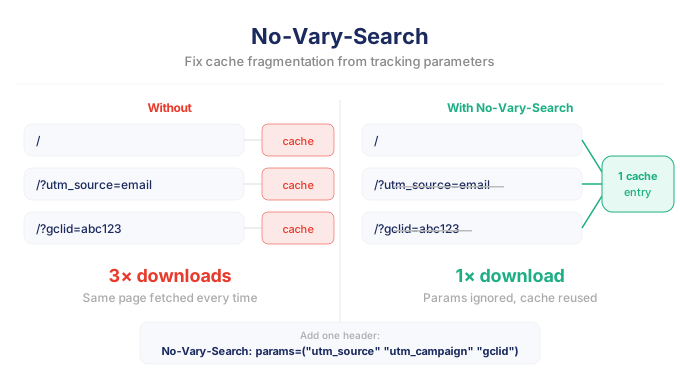
Tracking parameters are useful for marketing attribution, but they quietly introduce a caching problem across the web. Browsers treat URLs with different query parameters as separate resources, even when the underlying page content is identical.
The new No-Vary-Search HTTP header allows servers to declare which parameters do not affect content, helping browsers reuse cached responses instead of downloading the same page again.
Chrome already supports
No-Vary-Searchheader on desktop and Android and will also roll out to other Chromium-based browsers.
Why query parameters break caching
Tracking parameters are everywhere, and they are a big caching threat. Marketing tools typically append query strings. Common examples are:
/?utm_source=email
/?utm_campaign=spring
/?gclid=abc123
These parameters are useful for attribution by third party trackers like Google Ads or Facebook pixels, but they introduce an invisible performance problem most developers are way too familiar with: cache fragmentation.
How it hurts ROI
As a matter of fact, RUMvision has already showed merchants how Google Ads often make those very same ads and their ROI less efficient.
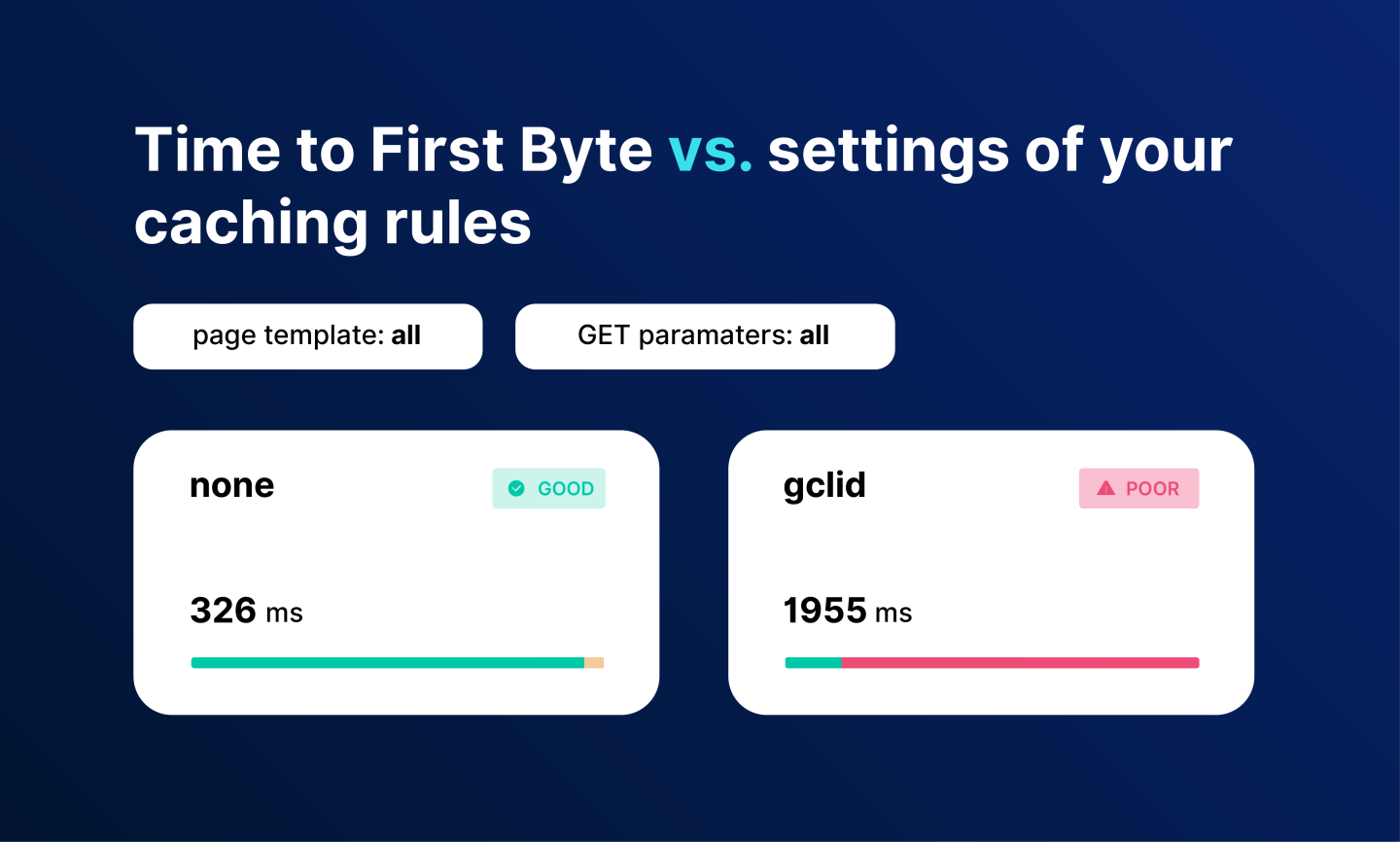
Our data shows that the question should actually be: by…
We also saw it happening for site using Google Merchant Center as they automatically and unknowingly received traffic with a new query string parameter. Our data showed many sites were affacted by this new srsltid parameter, ironically added by Google themselves.
Why it breaks cache
Consider these URLs:
https://example.com/
https://example.com/?utm_source=email
From a user perspective they likely show the same page. But from a cache perspective they are different resources and cache won't be re-used.
In a nutshell, this happens as browsers and CDNs treat URLs with different query parameters as completely different resources. Even if the page content is identical. That means a user may download the same HTML document multiple times simply because the URL contains different tracking parameters.
Browsers therefore create separate cache entries for each one.
Over time this leads to:
- duplicated HTML responses in the browser cache
- unnecessary network requests
- reduced cache efficiency
On sites that rely heavily on marketing campaigns, this effect can become surprisingly large.
Fixing cache busting parameters
Luckily, this can be addressed in multiple ways.
Server-side caching
Most CDNs recognized this problem years ago. They allow you to configure rules such as:
- ignoring certain query parameters
- normalizing cache keys
- stripping tracking parameters
However these solutions have a few limitations:
- they are CDN-specific
- they do not help the browser cache
- they require manual configuration
There was no standardized way for the origin server to declare which parameters matter and which do not.
Client side caching
Client side caching is very common and already happens for many static resources like images, stylesheets, JavaScript and font files. Adding query strings is then typically done on purpose to force the browser to download a new version of a stylesheet.
The same applies to HTML pages too. Although those query strings, and especially third party related query string parameters, aren't added by site owners themselves.
Enter No-Vary-Search
That's where No-Vary-Search comes in, a response header which addresses this gap. We can instruct servers to tell caches that certain query parameters do not change the content of a page. Just by adding one additional HTTP response header: No-Vary-Search.
It allows the server to specify which query parameters should be ignored when caches decide whether two URLs represent the same resource. And I recently implemented this on a few sites.
A simple example:
No-Vary-Search: key-order, params=("utm_source" "utm_medium" "utm_campaign") With this header present, a browser can treat these URLs as equivalent for caching purposes:
/
/?utm_source=email
/?utm_campaign=spring
/?utm_source=email&utm_campaign=spring
All of them can reuse the same cached response. If you know which parameters should actually force fresh contents, this HTTP header is able to serve you too as No-Vary-Search supports two strategies:
How to ignore certain parameters
No-Vary-Search: params=("utm_source" "utm_campaign") Only these parameters are ignored for caching. You could also add "variantid" on productpages when variants are shown client side, and not handled nor used in your server side app logic.
Tip: In a reply on my post, Peter Jaar Blaakmeer shared a link to a maintained CSV list of common third party parameters that you might want to add to your ignore rules.
How to allow specific parameters to vary
No-Vary-Search: params, except=("page" "p" "q" "s" "productid") All parameters are ignored except the ones listed.
For sites with many marketing parameters, the second approach can be easier to maintain. Cache hit ratio is likely to improve.
However, when a developer deploys a new facet search where query parameters serves as server side filters, it could result in served cached responsed and thus unexpected behaviour.
Cases where No-Vary-Search helps
The header only helps when a cached response already exists and the browser later encounters the same page with different query parameters. Several common navigation scenarios fall into this category.
Speculation and prefetch mismatches
With Speculation Rules or link prefetching, the browser may fetch a page in advance.
Example:
prefetch → /pricing
But the user might navigate to:
/pricing?utm_source=newsletter
Without No-Vary-Search, the prefetched response cannot be reused.
With the header, the browser can treat both URLs as equivalent and reuse the prefetched HTML.
Marketing landing pages
A typical user journey might look like this:
/?utm_source=email
→ /products
→ /pricing
→ click logo → /
Without No-Vary-Search, the browser considers:
/
/?utm_source=email
to be different pages.
So navigating back to the homepage requires another network request.
With the header present, the cached homepage response can be reused.
Revisiting a page later
Users often revisit a site later without the original tracking parameters.
Example:
first visit → /?utm_campaign=sale
later visit → /
If the HTML response is cacheable, No-Vary-Search allows the browser to reuse the earlier cached response.
Where No-Vary-Search does not help
No-Vary-Search is not a silver bullet. There are a few important limitations.
Back-Forward Cache is not affected
Browsers already have a separate navigation cache called bfcache. BFCache leads to instant page navigations and improves Core Web Vitals as it stores a full in-memory snapshot of the page and restores it when the user presses the back or forward button.
Because the URL remains unchanged during history navigation, query parameters are not a problem there.
No-Vary-Search only affects HTTP caching, not bfcache.
HTML must be HTTP-cacheable
In reality, many HTML pages are served with the socalled CCNS header:
Cache-Control: no-store
In those cases, most browser won't store the response at all. In that case No-Vary-Search has no effect.
Chrome recently started allowing pages with
Cache-Control: no-storeto enter the Back/Forward Cache (bfcache).This does not change how
No-Vary-Searchworks, becauseNo-Vary-Searchonly affects HTTP cache matching, not bfcache behavior.
Browser and CDN support
Although already shipped in Chrome desktop (v141, September 2025) and Android (v144, January 2026), No-Vary-Search is still experimental at the time of writing. The proposal is still progressing through the standardization process.
Meanwhile, CDNs do not yet incorporate it into their cache key logic.
I’ve asked a few friends working at CDNs and they say there is interest in supporting it, but no public statements yet.
Barry Pollard at Web Performance Calendar
If CDNs adopt the header in the future, it could provide a standardized way to normalize query parameters across browsers, CDNs and proxies.
Start benefitting from No-Vary-Search
With No-Vary-Search, more navigations can be served from the browser cache, reducing unnecessary network requests.
Next step is allowing your HTML pages to benefit from HTTP caching. More typical headers to achieve this include:
Cache-Control: max-age=0, must-revalidate
This pattern allows the browser to cache the HTML but requires it to check with the server before reuse. Typical use cases include pages where content may change frequently or depends on user state, such as checkout or search results.
or
Cache-Control: public, max-age=300
This pattern allows the browser (and CDNs) to reuse the HTML without contacting the server for a short period. Typical use cases include pages where the content is relatively stable, such as homepage, blog articles and product category pages.
Why this matters for No-Vary-Search
Both caching strategies allow No-Vary-Search to work, because the browser is allowed to store the HTML response.
Without cacheable HTML, query parameter normalization cannot improve cache reuse.
Start monitoring with RUMvision
From a Real User Monitoring perspective, query parameter fragmentation can distort performance data. Multiple navigations to the same page may appear as separate downloads.
At RUMvision, URLs are normalized and query string parameters are grouped in a separate dimension. This way, RUMvision can segment hyperlinks and even templates, and detect gaps in caching strategies. Developers will immediately learn which search parameters should be added to their server side and client side caching rules.
If you're a merchant or involved with maintaining webshops in general, there's a 100% chance this is a common challenge. Not using RUM yet? Start tracking today!