Custom dimension
In short: Add information that is specific to your website, such as an author, deployment version, experiment, language or login state. RUMvision collects the value and makes it available as a dimension for filtering and grouping your real-user data.
Custom dimensions allow you to add context to your RUM data that RUMvision cannot know by default.
For example, you could use a custom dimension to:
- compare different frontend or application versions;
- analyse performance by author, category or page type;
- compare visitors that are logged in with visitors that are logged out;
- measure different variants of an experiment or feature flag;
- collect information that your CMS, data layer or page markup already exposes.
Once collected, these values become available as dimensions in RUMvision. You can use them to filter your data or group results and compare the performance of different segments.
What you can collect
When creating a custom dimension, you can choose how RUMvision should retrieve its value by selecting a specific custom dimension type. There are different options:
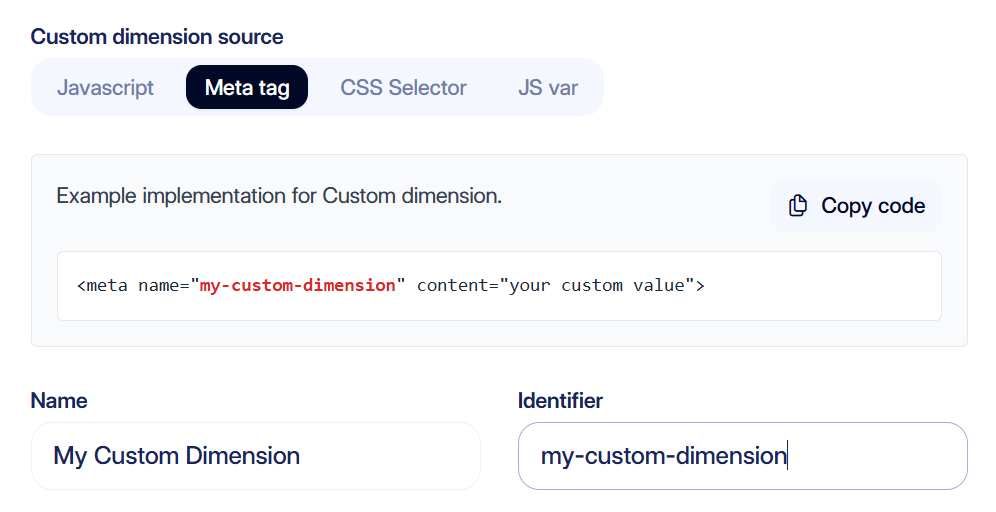
The best option depends on where the information already exists on your website.
JavaScript
Use the RUMvision JavaScript set API when you want to explicitly send a value to RUMvision yourself. This is useful when the value is calculated dynamically, is only known after specific application logic has run, or is not already exposed somewhere in the page.
To use the RUMvision JavaScript API, make sure the "Enable rumv() get/set API" feature is enabled under Developer settings. Without this feature, the API is not available on the page.
First create the custom dimension in RUMvision. The name you configure is then used when sending the value:
rumv('dimension', 'deploy_version', '2026.09.18'); Another example could be an experiment:
rumv('dimension', 'experiment', 'new-checkout'); This method gives you full control over when and which value is sent.
The custom dimension needs to exist in RUMvision before using it. Otherwise, values won't be stored.
Meta tag
Use Meta tag when the value is already available, or can easily be added, as metadata in the HTML document.
For example, a CMS could expose the current author:
meta name="author" content="John Doe"
You can then create a custom dimension named author and select Meta tag as its source.
Another example is exposing the active experiment:
meta name="experiment" content="new-checkout"
When multiple meta tags with the same name are present on a page, RUMvision collects and stores the value of each matching meta tag.
RUMvision can read the content value and add it to the RUM data automatically. Meta tags are especially useful when information is already known while rendering the HTML. This avoids adding additional JavaScript just to communicate the value to RUMvision.
CSS Selector
Use CSS Selector when the value is already present somewhere in the DOM.
This can be useful when your CMS or frontend already outputs information as an element or attribute, but you do not have a convenient JavaScript variable or meta tag available.
When a CSS selector matches multiple elements, RUMvision collects and stores the value of each matching element.
For example, your website might expose its language on the root HTML element. You could then configure the following selector:
html[lang]
and use the lang attribute as the value. This would result in:
en
Another example could be a page type. Using the following selector:
body[data-page-type]
with the data-page-type attribute allows RUMvision to collect:
product
When no attribute is used, a selector can also be used to retrieve text from an element. For example:
with:
.article-author
This approach is useful when information is already available in the DOM and you want RUMvision to collect it automatically without adding custom JavaScript.
Make your selector as stable as possible. Avoid selectors that depend on generated class names or DOM structures that frequently change between deployments.
JS var
Use JS var when the value already exists in a JavaScript variable on the page.
This is particularly useful for information exposed through a data layer, frontend application or another globally accessible JavaScript object.
For example, suppose your website exposes:
window.dataLayer.user_params.user_login_status
with a value such as:
logged_in
You can configure the following JS var in RUMvision:
dataLayer.user_params.user_login_status
RUMvision will resolve the variable and collect its value as the custom dimension.
For RUMvision to collect a JS var, the value must be accessible through the global window object.
Another example could be a content group:
dataLayer.event_params.content_group
This allows you to reuse information your website already exposes instead of duplicating the logic just for RUMvision.
The value does not necessarily need to exist immediately when RUMvision starts. RUMvision can continue checking for configured JS vars when they become available later on the page.
JS vars should resolve to a simple value such as a:
string
  number
  boolean
For complex objects, expose the specific property you want to use as the dimension instead of the entire object.
For example, prefer:
dataLayer.user_params.user_login_status
instead of:
dataLayer
Choosing a source
In most cases, you can simply use the source where the information already exists.
| Source | Use it when |
|---|---|
| JavaScript | You want to explicitly send or calculate the value yourself |
| Meta tag | The value is known when the HTML document is rendered |
| CSS Selector | The value is available in an HTML element or attribute |
| JS var | The value already exists in a JavaScript object or data layer |
There is no need to introduce JavaScript when the same information is already reliably available through a meta tag, DOM attribute or JS variable.
After creating a custom dimension
New values start being collected after the custom dimension is configured and the updated RUMvision configuration is active on your website.
Once data has been collected, the custom dimension can be used like other dimensions in RUMvision. You can:
- filter on a specific value;
- group your data by the dimension;
- combine it with dimensions such as page template, device type or browser;
- compare Core Web Vitals and other metrics between different values.
This makes custom dimensions especially useful for connecting technical performance data with the context of your own website.
