URLs
Your website likely consists of several page templates, each with its own performance characteristics. By tracking these templates separately, you can see how real users experience different parts of your website. We recommend tracking at least your most important templates.
Did you add or change URLs? Learn more about how soon you should see new data.
For an eCommerce website, these typically include:
- Homepage
- Product Detail Page (PDP)
- Product Listing Page (PLP)
- Category page
- Cart/Checkout pages
- User account pages
- Blog and other content pages
Import URL rules
Instead of adding URL rules manually, RUMvision can suggest a predefined set of rules for supported platforms configured in your domain’s tech stack settings.
You may see a prompt such as:
We see that you use platform X. Do you want to import the URL rules for this?
To receive these suggestions, make sure your platform is configured in your domain’s tech stack settings.
After importing the rules, you can edit them, add additional rules, or configure blocking rules at any time.
Selector types
We recommend using regular expressions or CSS rules to group URLs that share the same template. This lets you collect and analyse real-user data across all relevant pages, rather than monitoring individual URLs separately.
When adding a new URL, you'll see form fields similar to the screenshot below:
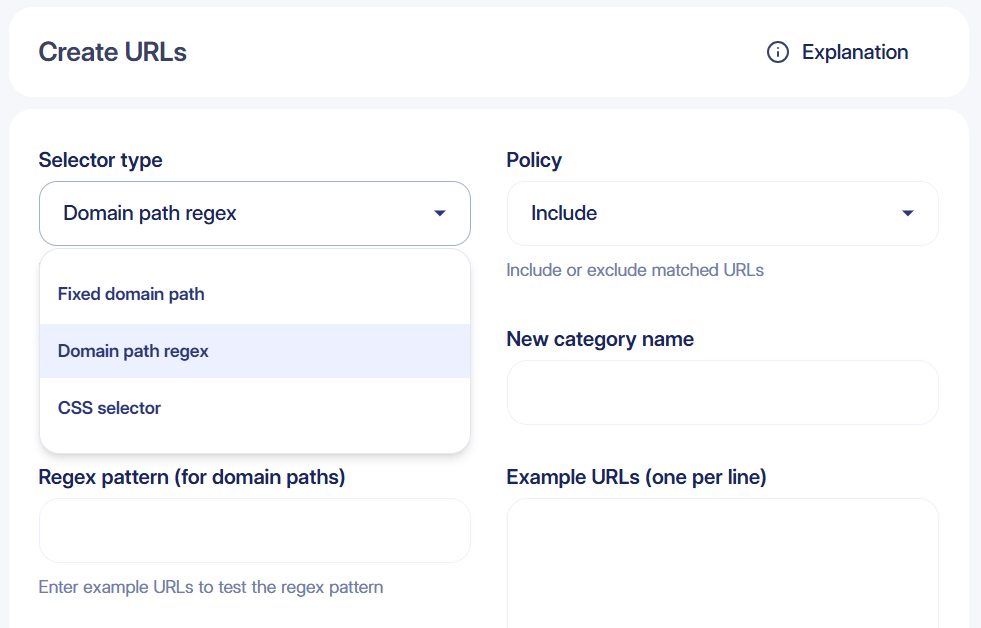
URL rules are matched against the URL pathname only
You can add URLs and templates in RUMvision in three different ways:
Fixed domain path
Matches an exact URL or path. This is the fastest and most precise method.
Domain path regex
Uses a regular expression to match multiple URLs with the same pattern. This allows track all URLs covered by a given template with one line.
When using this selector type, you can enter one or more example pathnames into the textarea. RUMvision instantly tests your regular expression against them, allowing you to verify the expected matches before saving the rule.
CSS selector
Matches pages based on a DOM element. Useful when the URL alone is not enough to identify a page type.
Where possible, use regular expressions first to improve matching reliability.
To actually make CSS selectors work, an element should have been parsed by the browsers when our snippet is running. Otherwise, it will never result in a match.
We will force our RUM to track on interactive state to improve tracking once CSS selectors are discovered in your URL rules.
Need help setting up anu of these URL rules? Feel free to reach out!
Policies, matching and order
Policies
Using the policy setting, you can choose whether matching pages should be included or excluded from tracking. The order of your rules matters here. If an exclude rule matches first, the RUMvision script will stop evaluating that page and will not track it. This allows you to track all blog pages, for example, while excluding specific pages when needed.
Pathname-only matching
URL rules are matched against the URL pathname only. Query strings and their parameters are not included when evaluating a URL rule, regardless of the selector type you use.
For example, for /search?q=shoes, RUMvision evaluates /search. The ?q=shoes part cannot be used to create or distinguish URL rules.
Matching order
In general, URL rules are evaluated in the following order:
Fixed domain path
Exact URL rules are evaluated first, as they provide the most direct match.Domain path regex + CSS selector
Regex and CSS selector rules are then evaluated in the order shown in your URL rules list.
You can change the order of these rules by dragging and dropping them using the drag icon (three horizontal bars at the start of each rule).
When using
^/as a catch-all, always place this rule last to prevent pages intended for more specific URL rules from falling into this catch-all instead.
Using a catch-all rule
A catch-all rule allows you to keep tracking pages that are not covered by any of your more specific URL rules. This can also help you discover page types that may be worth tracking as their own template later.
Add a catch-all rule
The simplest catch-all rule is:
^/
This matches any pathname that starts with a slash and can therefore be used to collect pages that did not match one of your more specific rules.
When using ^/ as a catch-all, always place this rule last. Otherwise, pages intended for more specific URL rules may fall into the catch-all before those rules are evaluated.
Automatically categorize catch-all
Instead of grouping all remaining pages into one large bucket, you can use a capturing group to capture the first segment of the pathname:
^/([^/]+)
For example, this would capture:
/blog/article/→blog/products/example/→products/account/settings/→account
RUMvision stores the captured value in the Template sub dimension. This gives you an automatically categorized view of the pages that are currently grouped under your catch-all template.
Keep in mind that ^/([^/]+) requires at least one path segment and therefore does not match the root pathname /. If your homepage should be tracked as well, configure it separately.
Review catch-all results
The catch-all can be useful as a discovery tool. Once enough data has been collected, review the Template sub values to see which groups of pages are receiving traffic and whether they deserve their own URL rule.
You can then decide whether a group should remain part of the catch-all, be identified as its own template, or be excluded from tracking altogether.
For important page types, we recommend creating a dedicated URL rule rather than relying on the catch-all and Template sub alone. RUMvision features such as Health Checks and MCP primarily use the main template when analysing or retrieving data. Giving important page types their own template therefore makes them easier to identify and work with throughout RUMvision.
Examples
Basic usage
Here’s an example of a regular expression that matches blog pages on the RUMvision website:
^/blog/[a-zA-Z0-9-]+/$
An alternative expression that matches the same URL structure is:
^/blog/[^/]+/$
In both examples, the $ indicates that the match must end after the final slash.
AI tools can also be a great help when writing regular expressions. Provide a few example URLs and describe which ones should or shouldn’t match, and they can often generate a suitable expression for you.
Other scenarios
The options below cover a few additional tracking scenarios. If your setup requires something different, contact us and we’ll be happy to help.
Track everything
If you don’t need to group pages into individual templates, you can use a single regular expression to track your entire website:
^/
Matches any pathname that starts with a slash, effectively including all pages on your website.
Keep in mind that tracking everything under a single template gives you less flexibility when analysing performance across different page types.
Exclude noindex pages
You can use a CSS selector to prevent pages marked as noindex from being tracked.
Add the following CSS selector:
meta[name='robots'][content*='noindex']
Set the policy to "Exclude". When RUMvision finds an element that matches this selector, the page will not be tracked.
Track search result pages
Some websites use query parameters for search result pages instead of a unique pathname. WordPress, for example, can use URLs such as:
/?s=shoes
Because URL rules are matched against the pathname only, RUMvision evaluates this URL as /. If your homepage is configured using / as a Fixed domain path, these search result pages will therefore match the homepage rule as well.
You can solve this by identifying search result pages using a CSS selector. WordPress, for example, adds a search-results class that can be matched using:
.search-results
However, Fixed domain path rules are evaluated before regex and CSS selector rules. If / is currently configured as a Fixed domain path for your homepage, replace it with a Domain path regex:
^/$
You can then place the .search-results CSS selector above the ^/$ homepage rule. Search result pages will match the Search template first, while regular visits to / will continue to match the Homepage template.
The exact CSS selector depends on your website and implementation. Inspect a search result page to find an element, class or ID that reliably distinguishes it from other page types.
Track 404 pages
You can use a CSS selector to track 404 pages. This helps you identify which non-existing URLs visitors reach and how often this happens.
To set this up, open a non-existing URL on your website and inspect the source code for a class or ID that is unique to your 404 page. For Shopify and Magento, for example, you could use:
body.template-404,body.cms-no-route
We recommend using "404" as the template label, so these pageviews are easy to identify in your data.
Capturing groups
RUMvision stores values from capturing groups in the Template sub dimension. If your regular expression contains multiple capturing groups, their matched values are concatenated into a single Template sub value.
For example, you capture language code and category name:
^/([a-z])/(hair|care|perfume|makeup|dermatology)(?:/[^?]*)?.html$
This would capture both the language and category. As a result, your Template sub values would become more specific, combining values such as en and perfume into en-perfume.
In most cases, we recommend keeping the language code outside a capturing group:
^/[a-z]/(hair|care|perfume|makeup|dermatology)(?:/[^?]*)?.html$
This keeps your Template sub values more generic, such as perfume, making it easier to compare the same category across different languages. RUMvision already tracks page language separately using the lang attribute on the html element.
You can still use parentheses without capturing their value by adding ?: at the beginning of the group. This creates a non-capturing group:
(?:/[^?]*)?
Non-capturing groups are useful for structuring and completing your regular expression without adding additional values to the Template sub dimension.
Track main category type
In short, capturing groups can be used to -for example- track category pages across multiple languages while still being able to compare specific category types, such as perfume, across those languages:
^/[a-z]/(hair|care|perfume|makeup|dermatology)(?:/[^?]*)?.html$
Happy to help
Our team are absolute experts in setting up URL rules for flexible data collection and filtering. Simply reach out to info op rumvision punt com and tell us your challenge/questions!
